Easy Access
Smart QR, Apple/Google SSO, Email/Phone Guest Mode
Flexible Payment
Apple/Google Pay
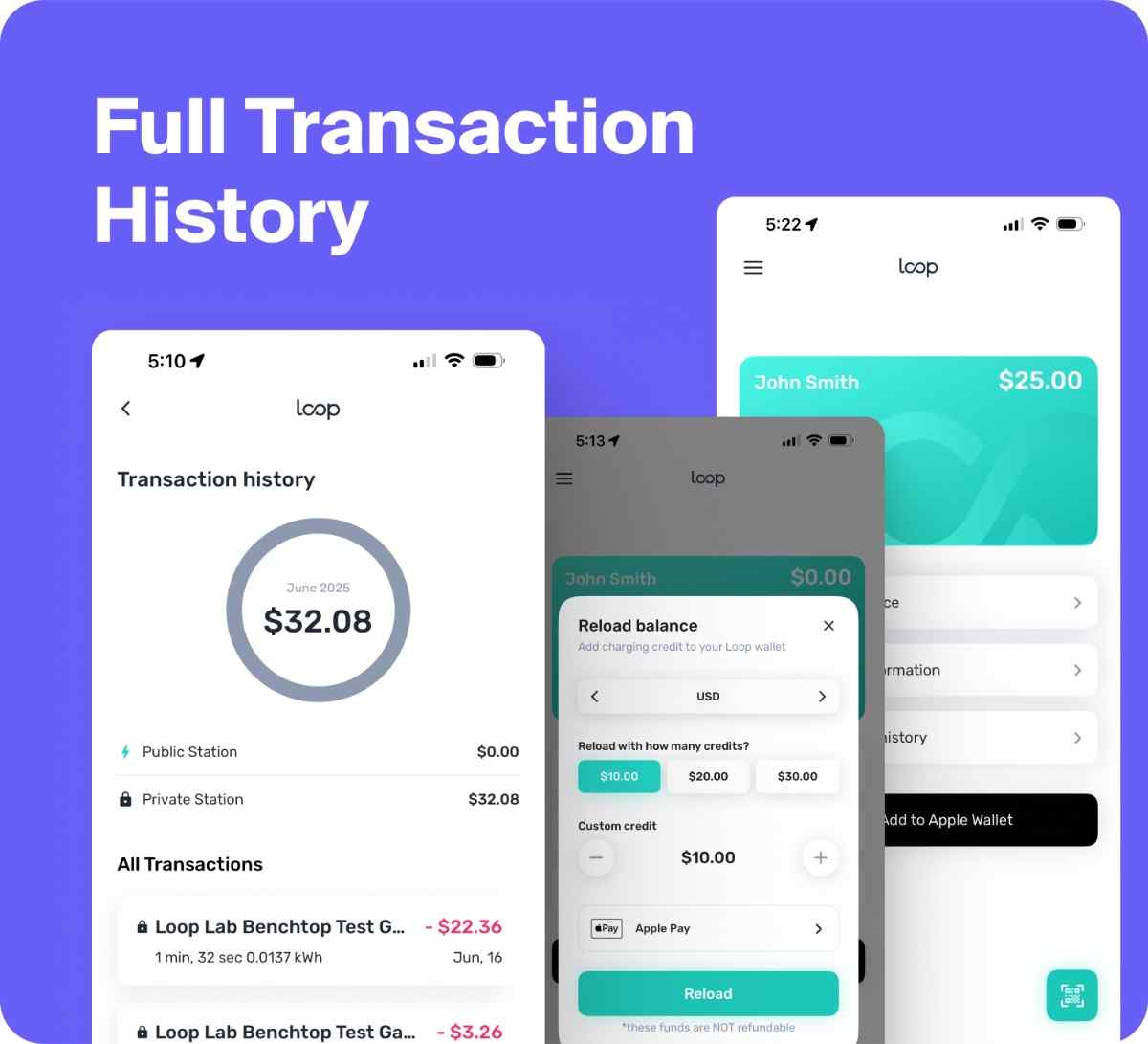
Full Transaction History
Maintain a credit balance for faster transactions
Convenient Charger Activation
Digital Loop Pass
Drivers can charge their EV in two easy ways
Mobile Phone via the Loop App.
Scan QR Code to the right. After downloading the app register an account and set up a payment method or subscription (if applicable).
Tap the green scan button and scan the QR code on the charger.
Plug in the connector to your EV and “Swipe to start charging” in the app.
To end your session, press “Stop Charging” in the app and unplug.
Tap or Insert your Credit Card or RFID Card.
Tap or Insert your Credit Card to the Credit Card Reader.
Select your Charging Port.
To Start Charging, plug in the connector to your EV.
a. For L2’s plug charger into vehicle, and hit start on the app.
b. For L3’s hit start before plugging the charger to your vehicle.
To end your session, press “Stop Charging” on the charger screen and unplug.
Frequently Asked Questions
- How can I purchase a Loop Solution?For custom order requests and related questions please email sales@loopglobal.com
- Do you have customer support if I get an issue?Yes, If you experience any issue or need immediate assistance, please call us at +1 (888) 385 66 71.
- What do I do when I get to the EV Station?You should open the Loop app on your mobile device and an account already set up. If you are at a "public" charging station, please scan the QR code by our app or find this station in the "Search" section of the Loop application. After that, you will be able to activate the charging session. If you are at a "private" charging station, you will need to pay for the subscription as required by the site host.
- How can an EV driver set up an account?There are a few easy options. You can use a phone number, email address or Google Sign In (on Android devices).
- How do I know if the charging station is compatible with my vehicle?Loop’s EV charging stations are compatible with all plug-in electric vehicles. Our level 2 charging stations are equipped with the SAE J1772 connector while the level 3 charging stations are equipped with the CHAdeMO & CCS connectors. Some vehicles may need an adaptor if it has a proprietary charge port. Please contact us if you are unsure if your car requires an adaptor.
- How can I charge my plug-in electric vehicle?Our users have a few options on how to start charging sessions. You can use the QR scanner in the Loop app to initiate the charging process, or you can use the "Search" section in our APP, find your station by address or name of the place and activate it. Additionally, you can use your personal RFID card to activate a charge.
- What if the Loop EV station doesn’t have a QR code?Normally, all of our EV charging stations have QR codes on the front panel. If for some reason a QR code is not visible, you can use the "Search" section in our APP, find your station by address or name of the place, and activate it. Additionally, you can use your personal RFID card to activate a charge. If you see such an issue please report it via the app "Support" section or on our website. You can also email support@loopglobal.com at any time to get in touch with our support team.
- How can you tell if a Loop charger is available to use?The status of all Loop chargers is clearly marked within the Loop app. Simply use the "Search" section in the application to find your station; under "Stations", you should see the text: "Open" or "Busy". If you see such an issue please report it via the app "Support" section or on our website. You can also email support@loopglobal.com at any time to get in touch with our support team.
- How much does charging cost?Rates vary depending on the station. Some private stations will have reduced rates, while others may charge slightly more depending on electricity costs. Drivers can check all rates on the mobile app. We guarantee any rates being offered to the customer will be completely transparent ahead of any charging session.
- Do I need a subscription to use an EV charger?For public stations, you’ll just need to have enough credit balance in your Loop account before starting the charge session. If the charging station is part of a private network, you may be asked to subscribe before being allowed to use that particular charging station. Not all private stations are subscription based, as Loop also has a simple Pay-Per-Use Access price structure. We guarantee any rates being offered to the customer will be absolutely transparent ahead of any charging session.
- How can I add a credit card or manage payment details?You can add a credit or debit card to the "Payment Information" section ahead of any car charging session. You can store multiple cards, update card numbers, or delete payment methods you no longer need.
- How can I top up my balance?Open your Loop app and navigate to the "Credit balance" section, then "Payment information". You can add your preferred payment card and then select "Reload balance". You can choose to reload or add credit amounts greater than $1. Drivers will be able to view their balance on the "Loop Wallet" section.
- How can I suggest new ideas and functionality for the Loop mobile app?If you have some proposals and suggestions, we want to hear them! Please visit our Contact Us page on the Loop app or this website and reach out to our team today. We're committed to making our app intuitive, fast, and simple.
- How do I delete my Loop app account?If you wish to delete your Loop App account, you have two options. First, you can log into the Loop app account, go to Settings, and select ''Delete My Account.'' This will guide you through the process directly within the app. Alternatively, you can navigate to the ''Delete Me'' page via the direct link in our app's listing in the Play Store or by visiting our website directly at https://loopglobal.com/